Next.js Folder Structure: What Actually Works (App Router vs Pages Router)
Open a fresh Next.js project and the first ten minutes usually go the same way: you stare at an empty src folder and wonder where on earth the login page is supposed to live. As a software development company in Ranchi, this is the exact folder structure we default to on every Next.js build, precisely because Next.js itself won’t tell you — there’s no enforced structure, which is either liberating or mildly anxiety-inducing depending on your mood that day.
The good news is that after enough of these projects (and enough messy ones cleaned up afterwards), a few patterns clearly hold up better than the rest. Below is the layout worth starting from, for both the App Router and the older Pages Router, along with a handful of habits that save you a painful refactor six months in.
Setting Up a New Project
Grab whichever package manager you already have installed:
# npm
npx create-next-app@latest my-next-app

# Yarn
yarn create next-app my-next-app

# pnpm
pnpm create next-app my-next-app
You’ll get walked through a few prompts:
✔ Would you like to use TypeScript? … Yes
✔ Would you like to use ESLint? … Yes
✔ Would you like to use Tailwind CSS? … (your call)
✔ Would you like to use `src/` directory? … Yes
✔ Would you like to use App Router? (recommended) … (your call)
✔ Would you like to customize the default import alias? … Yes
✔ What import alias would you like configured? … @/*
Two of these are worth a straight answer instead of “your call.” Say yes to src/ — it keeps config files out of your actual application code, and you’ll thank yourself once the project outgrows a weekend build. And unless you’ve got a specific reason to stick with the old system, go with the App Router. It’s where Next.js is putting all its effort, and fighting the current rarely pays off.
Path Aliases: So You Can Stop Writing ../../../../
Nobody wants to write this:
import Button from '../../../../components/ui/Button';
Next.js has a built-in fix — a path alias, usually @/, pointing at your src folder.
TypeScript projects set this in tsconfig.json:
{
  "compilerOptions": {
    "paths": {
      "@/*": ["./src/*"]
    }
  }
}
JavaScript projects do the same thing in jsconfig.json.
Once that’s in place, the same import turns into:
import Button from '@/components/ui/Button';
It’s a small thing. It also saves you from ever counting dots in a file path again, which counts for something.
App Router Structure
The App Router, since Next.js 13, uses folders as the router itself — the way you nest directories under app/ is your routing map. Here’s a structure that holds up as a project grows:
my-next-app/
├── .next/
├── public/
│   ├── favicon.ico
│   ├── images/
│   └── fonts/
├── src/
│   ├── app/
│   │   ├── (auth)/           # Route group for auth pages
│   │   │   ├── login/
│   │   │   │   ├── page.tsx   # /login
│   │   │   │   └── actions.ts # Server actions for this route
│   │   │   └── register/
│   │   │       └── page.tsx   # /register
│   │   ├── (dashboard)/      # Route group for dashboard pages
│   │   │   ├── dashboard/
│   │   │   │   └── page.tsx   # /dashboard
│   │   │   └── settings/
│   │   │       └── page.tsx   # /settings
│   │   ├── api/
│   │   │   └── route.ts      # API endpoint
│   │   ├── user/
│   │   │   ├── [id]/         # Dynamic route
│   │   │   │   └── page.tsx  # /user/[id]
│   │   │   └── page.tsx
│   │   ├── error.tsx         # Error boundary
│   │   ├── layout.tsx        # Root layout
│   │   ├── loading.tsx       # Loading UI
│   │   ├── not-found.tsx     # 404 UI
│   │   └── page.tsx          # Home page (/)
│   ├── components/
│   │   ├── ui/
│   │   │   ├── Button.tsx
│   │   │   └── Card.tsx
│   │   ├── layout/
│   │   │   ├── Header.tsx
│   │   │   └── Footer.tsx
│   │   └── forms/
│   │       └── LoginForm.tsx
│   ├── hooks/
│   │   └── useAuth.ts
│   ├── lib/
│   │   ├── utils.ts
│   │   └── api.ts
│   ├── styles/
│   │   └── globals.css
│   ├── types/
│   │   └── index.ts
│   └── middleware.ts
├── .eslintrc.json
├── .gitignore
├── next.config.js
├── package.json
├── README.md
└── tsconfig.json
The special files, quickly
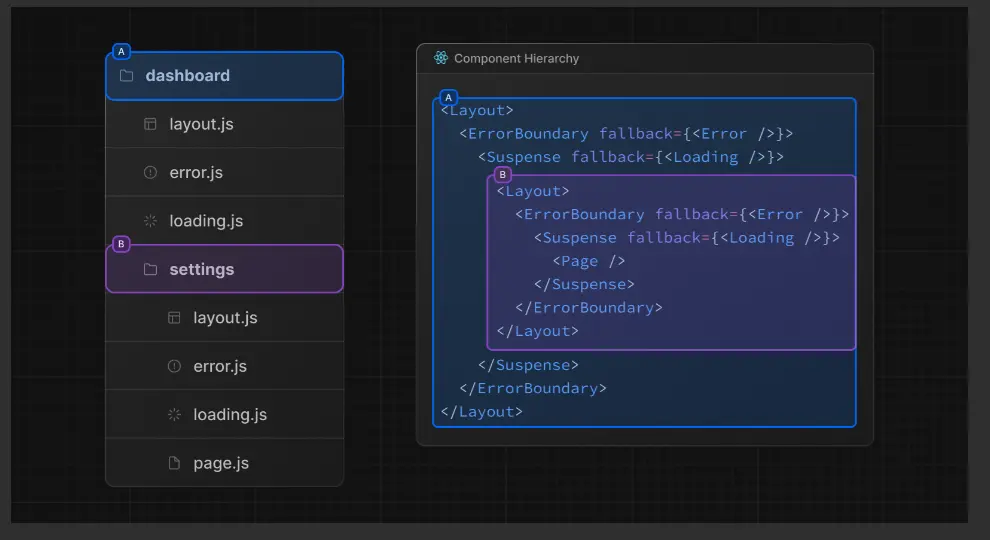
page.tsx— the UI for a routelayout.tsx— shared UI wrapping a segment and everything under itloading.tsx— what shows while a segment is loadingerror.tsx— the error boundary for a segmentnot-found.tsx— your custom 404route.ts— an API endpoint
Route groups — folders in parentheses, like (auth) — exist purely to organize your codebase. They don’t show up in the URL at all, which took me a minute to get used to the first time I saw one.
Dynamic routes use square brackets: [slug] for one dynamic segment, [[...slug]] when you need an optional catch-all.
Pages Router Structure
Still maintaining something on the Pages Router? Fair enough — plenty of production apps still run on it. Here’s the equivalent:
my-next-app/
├── .next/
├── public/
│   ├── favicon.ico
│   ├── images/
│   └── fonts/
├── src/
│   ├── pages/
│   │   ├── _app.tsx         # Custom App component
│   │   ├── _document.tsx    # Custom Document
│   │   ├── index.tsx        # Home page (/)
│   │   ├── about.tsx        # /about
│   │   ├── user/
│   │   │   ├── [id].tsx     # Dynamic page
│   │   │   └── index.tsx    # /user listing
│   │   └── api/
│   │       └── hello.ts     # /api/hello
│   ├── components/
│   │   ├── ui/
│   │   ├── layout/
│   │   └── forms/
│   ├── hooks/
│   ├── lib/
│   ├── styles/
│   └── types/
├── .eslintrc.json
├── .gitignore
├── next.config.js
├── package.json
├── README.md
└── tsconfig.json
A few things worth knowing here:
_app.tsxhandles global layout and any state you want shared across every page_document.tsxis where you touch the initial HTML shell, if you ever need to- Routing is literal —
pages/about.tsxbecomes/about,pages/blog/[slug].tsxbecomes/blog/:slug - Anything dropped into
pages/apiautomatically turns into an API route, no config needed
Running Both at Once (Migration Mode)
Mid-migration and not ready to commit fully? Next.js 13+ lets the App Router and Pages Router live side by side:
my-next-app/
├── src/
│   ├── app/                 # App Router routes
│   │   └── new-feature/
│   │       └── page.tsx     # /new-feature
│   ├── pages/               # Pages Router routes
│   │   ├── _app.tsx
│   │   ├── index.tsx        # /
│   │   └── about.tsx        # /about
│   └── ...
Worth remembering: if the same route exists in both app/ and pages/, the App Router version wins every time. Good to know before you spend twenty minutes debugging why your old page won’t update.
A Few Habits Worth Adopting
Pick one way to organize components and actually stick with it. The two that come up most:
By feature:
src/
├── features/
│   ├── auth/
│   │   ├── components/
│   │   ├── hooks/
│   │   └── utils/
│   └── products/
│       ├── components/
│       ├── hooks/
│       └── utils/
By type:
src/
├── components/
│   ├── ui/
│   ├── layout/
│   └── forms/
├── hooks/
└── utils/
Feature-based tends to age better once you’ve got several people working on the same codebase — by-type is perfectly fine for smaller projects. Neither is objectively better. What kills a codebase is switching between the two halfway through, which happens more often than anyone likes to admit.
Pull logic out before it calcifies inside a component. Custom hooks belong in hooks/. General helpers go in lib/ or utils/. Anything that talks to an API gets its own home rather than living wherever it was first needed.
Give global state its own folder if you’re using Redux, Zustand, or similar — don’t let slices scatter across the app:
src/
├── store/
│   ├── index.ts
│   ├── slices/
│   │   ├── authSlice.ts
│   │   └── cartSlice.ts
│   └── selectors.ts
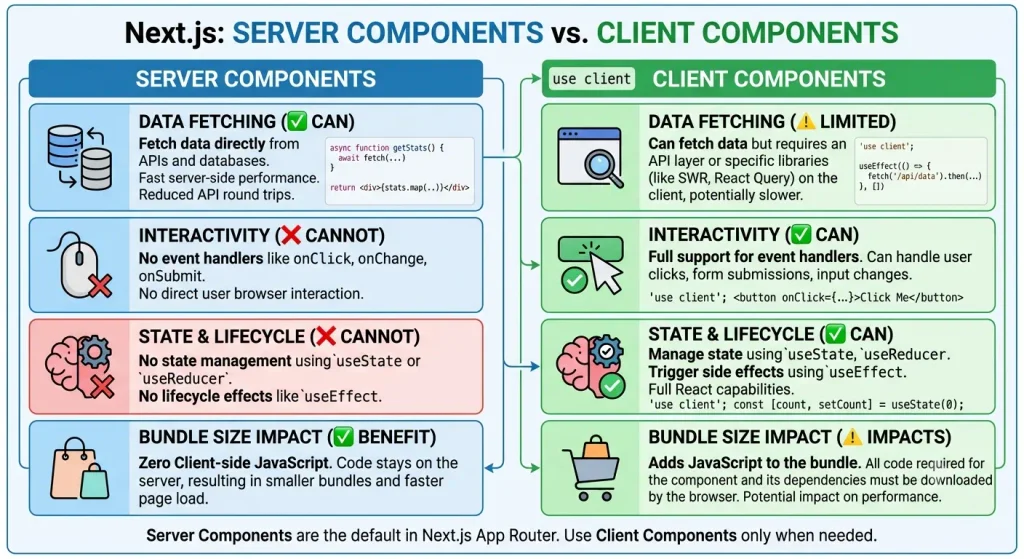
Know which components are server vs. client — this trips up almost everyone coming from the Pages Router. In the App Router, server components are the default; you don’t add anything to get one. Client components have to say so explicitly:
'use client';

import { useState } from 'react';

export default function Counter() {
  const [count, setCount] = useState(0);
  return (
    <button onClick={() => setCount(count + 1)}>
      Count: {count}
    </button>
  );
}
Keep environment variables sorted by who’s allowed to see them. Anything prefixed NEXT_PUBLIC_ ships to the browser. Everything else stays server-only, which matters a lot more than it sounds like the first time you accidentally leak an API key.
# .env.local
NEXT_PUBLIC_API_URL=http://localhost:3000/api
// Exposed to the browser
const apiUrl = process.env.NEXT_PUBLIC_API_URL;

// Server-only
const apiKey = process.env.API_SECRET_KEY;
Why a Software Development Company in Ranchi Uses This Exact Structure
We didn’t pick this layout arbitrarily — it’s the structure our team defaults to as a software development company in Ranchi, because it holds up whether we’re shipping a small marketing site or a full custom platform with a real backend. The same conventions above (route groups, a clean lib/ and hooks/ split, server components by default) are what let a project stay maintainable past the first few sprints, regardless of which company ends up building it.
FAQ
If you’d rather hand the build off than maintain it in-house, yes — a software development company in Ranchi that already works in this stack can take a project from this same folder structure through to a shipped, maintained product, including the backend, auth, and deployment pipeline around it.
App Router, almost every time. You get React Server Components, streaming, nested layouts without duplicating markup, and loading/error states that are actually handled for you instead of hand-rolled. The Pages Router is fine for apps that already work — no need to rewrite something that isn’t broken.
Underscore the folder name — _components, _lib, and so on. Next.js skips anything prefixed with an underscore when it builds routes.
src/app/
├── _lib/
├── _components/
└── page.tsxsrc/lib holds utilities the whole app relies on. src/app/_lib is for logic that only the routes under app/ need. If it’s used anywhere outside app/, it belongs in the top-level lib — not the other way around.
With Turborepo or similar, your Next.js app becomes one piece among several, with shared code pulled into its own packages:
my-monorepo/
├── apps/
│   └── web/
│       ├── src/
│       │   ├── app/
│       │   └── ...
│       └── package.json
├── packages/
│   ├── ui/
│   └── utils/
└── package.jsonNo. Think of it as a sensible starting point, not a rulebook. The right structure is the one your team can navigate without someone asking “wait, where does this go?” every other week. Refactor it as the app grows — that’s normal, not a failure.
Yes, that’s a pretty normal thing to hand off. If you’re a business in Ranchi, Jharkhand and would rather have someone else own the build, this is exactly the kind of project a web development company in Ranchi, Jharkhand like Raghuvartech takes on — everything from a marketing site to a full custom software or ecommerce platform, built on the same App Router conventions covered above.
It ranges pretty widely: company websites, mobile apps, ecommerce platforms, custom software builds, and increasingly AI features — chatbots, RAG-based search, internal automation — layered on top of a Next.js front end with a full stack Node.js backend. If you’re comparing a few software development companies in Ranchi for a project like this, it’s worth asking directly how they structure and maintain the codebase over time. The conventions above are a reasonable baseline to check against.
Sometimes it’s just branding, but often not. A website development company usually focuses on marketing sites and simpler builds. An IT consulting and software development company, or a full stack development company in Ranchi, is more likely to handle the harder stuff — custom software, mobile apps, AI development, ecommerce platforms with real backend logic. Worth clarifying up front which one you’re actually talking to.
You can look up Raghuvartech, a software and mobile app development company in Ranchi, Jharkhand, on Google Maps.
Got a setup that’s worked better for your team, or a structure you’d argue against something above? That’s normal — the goal was never a perfect diagram, just a project people can actually move through quickly.